1
Download the package
Save the installation package, then double-click it.
Get started
Install CoreCP in seconds, migrate the assets you already have, then launch Creo from File Explorer.

Whether you have a brand-new machine or an existing workstation, installation takes only a few seconds.
Download the CoreCP Setup package. Double-click to extract, and the automated installer will instantly build your workspace scaffold, migrate your existing configuration and template files, and generate all of your Start Menu shortcuts.
Save the installation package, then double-click it.
Choose where to establish your CoreCP Anchor.
Point to your key configuration files. It then registers right-click actions and creates two desktop shortcuts.
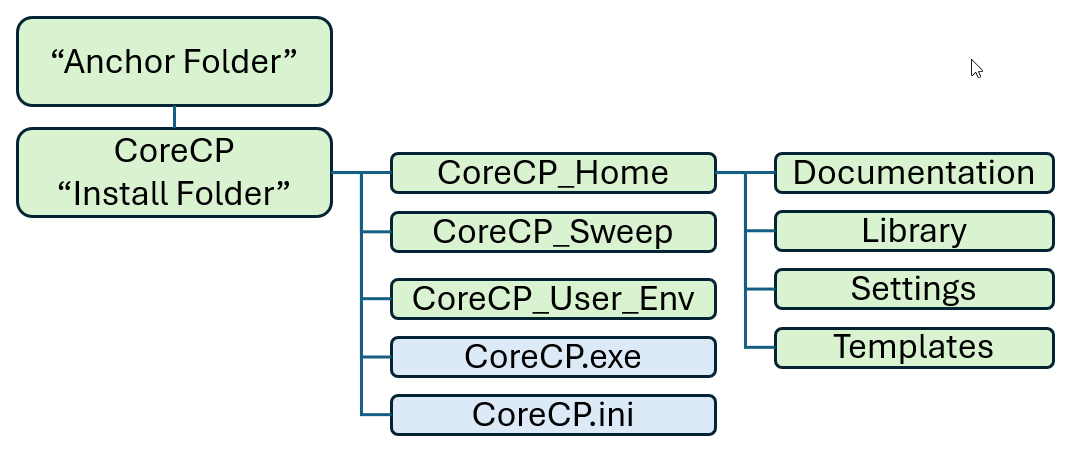
Your CoreCP file structure will look like this diagram. The installer copies your templates and configuration files into a new CoreCP_Home folder and leaves every original file where they were.
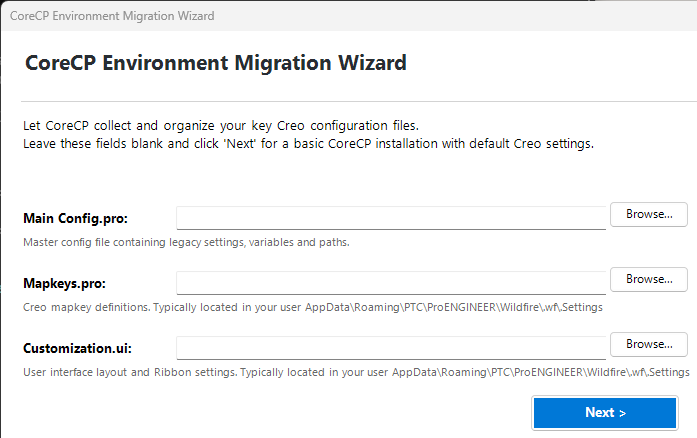
Bring your assets with you. The wizard ingests existing Creo templates, formats, system colors and more. Original files are copied; configurations are merged.
Named after the Foundation folder. Double-click to launch the newest installed Creo on that folder while running the sweep routine.
The CoreCP Restore desktop shortcut browse and recover older iterations from the sweep bin.
Right-click any folder in Explorer to trigger CoreCP Launcher or CoreCP Cleaner on that folder.
Choose a 3, 6, or 12 month lease, or unlock unlimited access with a lifetime license.
Use Discount code Intro26 for 25% off.
e-Cognition is Leo Greene. He has over 25 years immersed in the improvement and implementation of product development systems and processes using Creo Parametric, PTCs flagship CAD design software.